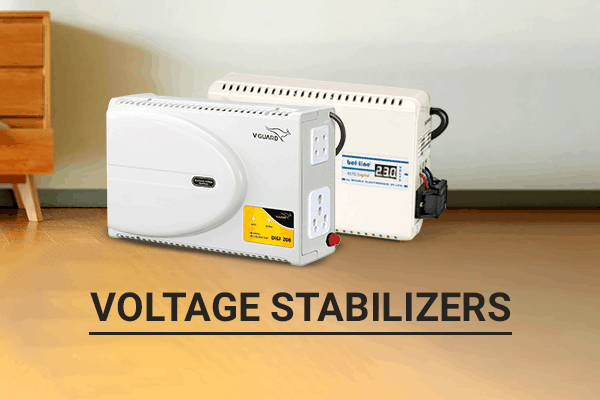
Troubleshooting voltage stabilizers involves identifying common problems related to their performance, understanding their potential causes, and resolving them step-by-step. Here’s a guide to help you troubleshoot issues with voltage stabilizers:
1. No Power Output (Stabilizer Is Not Working)
- Possible Causes:
- The stabilizer is not plugged in properly or has loose connections.
- The fuse or circuit breaker in the stabilizer is blown.
- The stabilizer’s internal components (transformers, capacitors) may be damaged.
- Troubleshooting Steps:
- Check the power supply and ensure the stabilizer is correctly plugged into a functioning outlet.
- Inspect the fuse or circuit breaker inside the stabilizer and replace it if needed.
- If the issue persists, inspect the internal components for visible damage, or consult a technician for a thorough internal check.
2. Voltage Fluctuations or Inconsistent Output
- Possible Causes:
- The stabilizer is overloaded (i.e., it is handling more load than it is rated for).
- The stabilizer is malfunctioning or unable to regulate voltage due to internal faults (e.g., transformer issues).
- Input voltage is unstable or too low/high for the stabilizer to compensate.
- Troubleshooting Steps:
- Verify that the load connected to the stabilizer is within the specified limits. If overloaded, disconnect some appliances or devices.
- Measure the input voltage at the stabilizer input using a voltmeter to see if it is within acceptable limits for the stabilizer to regulate.
- If the stabilizer is not adjusting the voltage properly, there may be a fault in its voltage-sensing mechanism or transformer. In this case, you may need a professional technician for repairs.
3. Overheating or Continuous Running
- Possible Causes:
- The stabilizer is running under excessive load, causing overheating.
- A faulty fan or cooling mechanism in the stabilizer is preventing proper cooling.
- The stabilizer is malfunctioning due to internal component failure.
- Troubleshooting Steps:
- Ensure the stabilizer is not overloaded. Disconnect any non-essential devices to reduce the load.
- Check if the cooling fan is working correctly and not obstructed by dirt or debris. Clean the fan if necessary.
- If the stabilizer still overheats, disconnect the power and allow it to cool down. Test it again after a break, and if the issue continues, consider professional servicing.
4. Failure to Correct Voltage Surges or Spikes
- Possible Causes:
- The surge protection mechanism may be damaged.
- The MOV (Metal Oxide Varistor) or surge protection components have degraded after repeated exposure to voltage spikes.
- Troubleshooting Steps:
- Test the stabilizer’s ability to handle voltage surges by simulating a voltage spike (using a test setup or circuit with a known surge).
- Inspect and replace the MOVs or other surge protection components if they appear damaged or burnt out.
- If the surge protection system is not functioning properly, it may require replacement or repair by a professional.
5. Unusual Noise or Vibration
- Possible Causes:
- The transformer inside the stabilizer may be loose or malfunctioning.
- Loose components or mounting screws inside the stabilizer may cause vibrations.
- Troubleshooting Steps:
- Ensure that all internal components are securely mounted and that no screws or parts are loose.
- Inspect the transformer for visible damage. If it is making an unusual noise, it may need to be repaired or replaced.
- Check for any foreign objects inside the stabilizer that may be causing the noise or vibration.
6. Erratic or Incorrect Output Voltage Display
- Possible Causes:
- Faulty sensors or voltage sensing circuits in the stabilizer.
- Calibration issues or malfunctioning digital display.
- Troubleshooting Steps:
- Check the output voltage using a voltmeter to verify that the stabilizer is providing the correct voltage.
- If the display is showing incorrect readings, it may need recalibration or servicing.
- Inspect the sensors or voltage sensing circuitry for faults. You may need professional repair or replacement if the internal components are malfunctioning.
7. Incorrect Wiring or Connections
- Possible Causes:
- Incorrect installation or wiring issues such as a reversed polarity connection.
- Loose or damaged input/output wiring.
- Troubleshooting Steps:
- Double-check the wiring connections to ensure that the stabilizer is correctly connected to both the power supply and the load.
- Look for any loose or damaged wires and repair or replace them as needed.
- Make sure the stabilizer’s input and output connections follow the correct polarity and voltage requirements.
By systematically checking the power supply, load, internal components, and cooling mechanisms, you can identify and address common issues with voltage stabilizers. If the problem persists or involves complex components like transformers or surge protection circuits, it’s often best to consult a professional technician for repair or replacement.